Burn marks on wood are not just a cosmetic problem. They usually mean the cutter is rubbing instead of cutting, which wastes material, shortens tool life, and slows production because the operator has to sand away the damage afterward.
The fastest way to diagnose the issue is to stop thinking only about RPM. In wood machining, edge quality depends on chipload, the balance between feed rate, spindle speed, and flute count. When that balance is wrong, the router generates heat faster than the cut can carry it away.
This article breaks down why burning happens, how to use the chipload formula in practical terms, and what to check on your wood cutting CNC router before blaming the machine or the operator.
Why wood burns during CNC routing
Wood burns when the bit stays in contact with the same fibers too long and friction builds up faster than the chips can remove heat. Four causes show up most often in production shops.
- High spindle speed with low feed rate. The tool spins fast but advances too slowly, so it grinds the edge instead of shearing cleanly.
- Wrong flute count. Too many flutes can pack chips into the cut, especially in wood, MDF, and plywood where dust extraction matters.
- Dull, dirty, or resin-loaded bits. Even a correct program cannot save a bit that is no longer cutting efficiently.
- Poor chip evacuation. If dust stays in the kerf, heat climbs quickly and the burn marks usually follow.
The chipload formula that actually matters
Chipload tells you how much material each flute removes on every revolution. The basic formula is:
Chipload = Feed Rate / (Spindle RPM x Number of Flutes)
For example, if a machine runs at 18,000 RPM with a 2-flute bit and you want a 0.25 mm chipload, the feed rate should be 18,000 x 2 x 0.25 = 9,000 mm/min. If you keep the same RPM and drop the feed too low, the chipload collapses and the tool starts rubbing the wood.

How to interpret chipload in the shop
If the chipload is too low, you will usually see dust instead of chips, hear a high-pitched whine, and smell burning. The edge may turn dark even though the cut path looks smooth at first glance.
If the chipload is too high, the machine load increases, the bit may deflect, and the surface can chip or tear. That is why the goal is not maximum chipload. The goal is a stable chipload inside the tooling maker’s recommended range.
Tooling charts should always win if you have them. But when you do not, the formula still gives you a more reliable starting point than guessing by feel.
Practical starting points by material
Use these as directional starting points only. Cutter diameter, tool geometry, step-down, hold-down strength, and spindle power all affect the final result.
| المواد | Typical Bit Choice | General RPM Direction | Cut Quality Goal |
| MDF and plywood | 1 or 2 flutes | Moderate to moderately high RPM | Clean edge, low fuzz, chips not dust |
| Hardwood | 1 or 2 flutes, sharp carbide | Moderate RPM with controlled feed | Prevent scorch marks and edge glazing |
| Softwood | 1 or 2 flutes | Moderate to higher RPM with healthy feed | Fast chip evacuation without tear-out |
A simple tuning process for burnt edges
- Confirm the bit is sharp, clean, and suitable for wood. Do not tune a worn tool.
- Choose a target chipload from the tooling maker or a conservative internal benchmark.
- Calculate feed rate from RPM and flute count instead of guessing.
- Run a short test cut and inspect the chips, sound, edge color, and spindle load.
- Adjust one variable at a time. If the edge burns, increase feed or reduce RPM first. If the cut becomes rough, ease the load back slightly and retest.
What a capable router should help you do
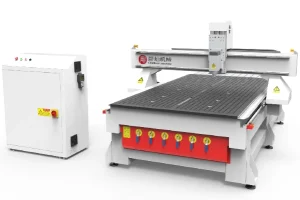
A good wood cutting CNC router should make correct chipload easier to hold, not harder. That means a rigid frame, steady spindle performance, reliable servo motion, and effective dust extraction around the bit.
For shaped furniture components, curved parts, or more complex 3D surfaces, a 4-axis wood cutting CNC router gives better access and motion flexibility. For flat panel production, cabinet work, and repeatable sheet processing, a stable ATC router with a strong bed and dependable feed control is usually the more practical choice.
The machine does not replace parameter knowledge, but it should support the feed rates needed for clean cutting without shaking, drifting, or losing consistency.
أسئلة متكررة
Q: How can I tell if feed rate is too slow?
A: Look for fine dust, a sharp whining sound, dark edges, and extra heat at the bit. Those signs usually mean the tool is rubbing.
Q: Can the wrong router bit cause burning even if the math looks right?
A: Yes. Too many flutes, poor geometry for wood, or a dull edge can trap chips and create heat even when the calculated settings seem reasonable.
Q: Should I solve burning by lowering RPM or by increasing feed?
A: Usually start with the least disruptive correction that restores chipload. In many cases that means increasing feed slightly or reducing RPM moderately, then testing again.
Q: Why do I still get burns on corners or small radii?
A: Because the machine slows locally in tight geometry, which changes the effective chipload. Toolpath strategy and machine acceleration settings may need attention too.
Conclusion
Burning is usually a parameter balance problem, not a mystery. Once you understand chipload, you can diagnose whether the tool is cutting or rubbing and make more confident changes on the controller.
For wood cutting CNC router work, the best habit is to calculate a starting point, run a short test, inspect the chips, and adjust from evidence. That produces cleaner edges and more stable output than chasing finish quality by RPM alone.